Sevalla vs Render: Which Cloud App Platform Should You Choose?
Sevalla vs Render is a comparison between two managed application platforms that remove much of the work involved in building and operating cloud infrastructure. Both can deploy code from Git, run web services and connect applications to managed data services. The difference is in platform scope, deployment workflow, regional coverage and how teams pay for resources.
Render is usually the safer default for teams that want a mature, developer-focused PaaS with clear service types, Blueprint-based infrastructure definitions and a familiar path from Git to production. Sevalla is a strong alternative for teams that want broad location choice, usage-based infrastructure, integrated application pipelines and adjacent services such as object storage under one control plane.
The right answer depends less on a homepage feature count than on the topology you need to run: web processes, workers, cron jobs, databases, private services, storage, preview environments and the regions where users and data live.
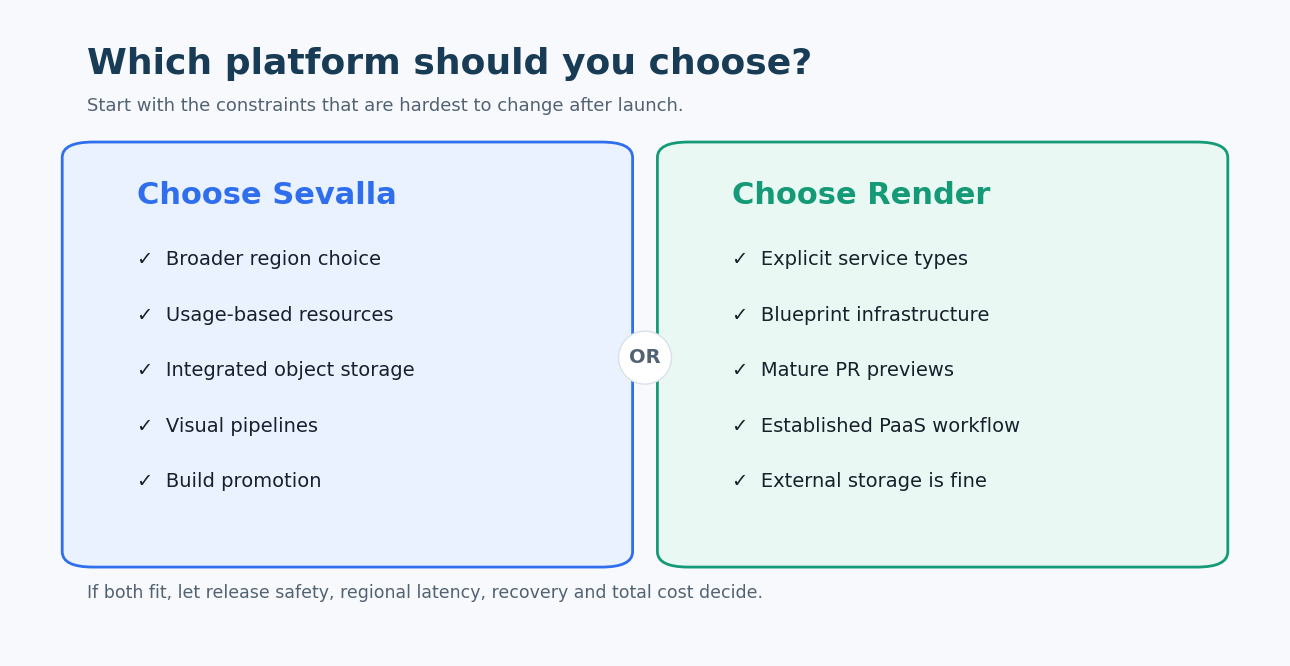
Both platforms run applications and managed data services. Sevalla emphasizes a broad integrated cloud surface; Render emphasizes clearly defined service types and a mature application-platform workflow.
Sevalla vs Render: the quick answer
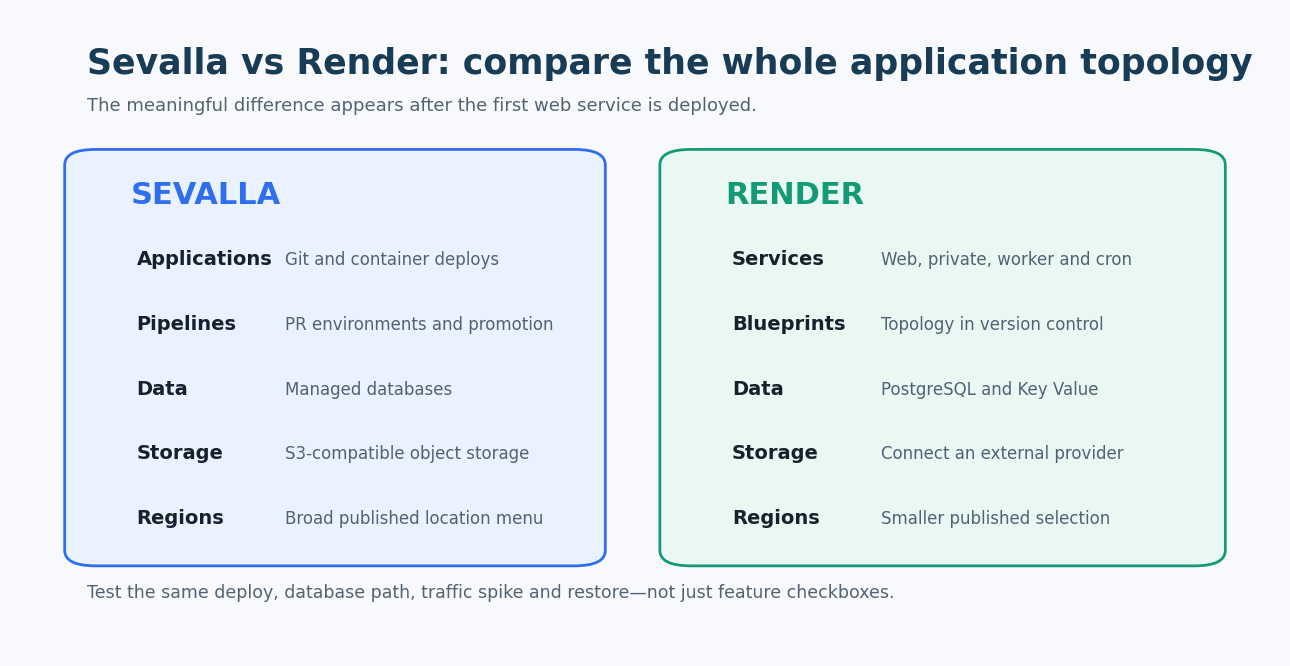
- Choose Sevalla when region choice, usage-based resource billing, built-in object storage, visual pipelines or promoting an existing build between environments are high priorities.
- Choose Render when your team values established web, private, worker and cron service primitives; Blueprint infrastructure as code; mature preview environments; and predictable instance-oriented deployment patterns.
- Benchmark both when workloads are spiky or globally distributed. Deploy the same application, database and background jobs, then compare cold starts, build time, p95 latency, scaling behavior and a complete monthly bill.
Sevalla vs Render comparison table
| Comparison area | Sevalla | Render |
|---|---|---|
| Core product | Managed cloud platform for applications, databases, static sites and object storage | Managed application platform for web services, private services, background workers, cron jobs, static sites and data services |
| Best fit | Teams seeking broad regional deployment, integrated pipelines and usage-oriented infrastructure | Teams seeking a mature developer PaaS with explicit service types and Blueprint-based configuration |
| Source deployment | Git-connected and container-based application workflows | Git-connected repositories, prebuilt images and Docker-based workflows |
| Service model | Applications can define processes and resources within the platform | Separate web, private, worker and cron service types make process roles explicit |
| Build workflow | Builds, deployments and pipeline promotion are surfaced in the Sevalla control plane | Native build and deploy flow with deploy hooks, rollbacks and service-specific settings |
| Preview environments | Pull-request environments are supported for application testing | Preview environments can create disposable copies of services and data resources from a Blueprint |
| Pipelines | Visual application pipelines organize environments and support promotion workflows | Branches, preview environments and Blueprints provide environment control; no identical visual-pipeline abstraction |
| Build promotion | Can promote a previously built deployment between pipeline environments without rebuilding | Deploys and rollbacks are service-oriented; validate the desired artifact-promotion workflow |
| Autoscaling | Application autoscaling is included in the base offering | Autoscaling is available on eligible services and workspace plans |
| Regions | Sevalla documents a broad set of global data-center locations; its infrastructure transition makes live availability important to verify | Render publishes a smaller set of regions for services and databases; selection varies by product |
| Managed databases | Integrated managed database service with supported relational and in-memory engines | Managed PostgreSQL and Key Value services, with plan-specific availability and features |
| Object storage | Native S3-compatible object storage with usage-based pricing and no listed ingress or egress fees | Not positioned as a general-purpose object-storage product; applications commonly connect an external provider |
| Static sites | Free static-site hosting is available, subject to current allowances | Static sites are supported with global delivery and plan-based bandwidth |
| Private networking | Applications and databases can communicate inside the platform’s private environment, reducing costs | Private services and private networking support internal application topologies |
| Infrastructure as code | API, MCP, CLI, Terraform, and automation capabilities support platform management | Render Blueprints define services, databases and environment relationships in YAML |
| Observability | Application logs, metrics and deployment telemetry are integrated | Logs, metrics, events and plan-dependent observability features are integrated |
| Pricing model | Usage-based pricing for application and database resources, with low starting resource sizes | Service-instance pricing plus bandwidth and workspace or feature considerations |
| Team model | Platform access and resource billing should be modeled from the current account terms | Workspace plans affect collaboration, previews, scaling and other platform features |
| Main tradeoff | Newer platform history and an infrastructure transition require careful validation of regional and operational details | Smaller region menu and reliance on external services for some adjacent infrastructure, including object storage |
Platform limits, locations and pricing change. Confirm the current documentation and region availability before committing production workloads.
Platform scope and application architecture
Render presents infrastructure as distinct service types. A public HTTP application becomes a web service, an internal API can be a private service, queue consumption belongs in a background worker, and scheduled work belongs in a cron job. That explicit model makes architecture easy to reason about and maps cleanly to a Blueprint.
Sevalla groups application processes and resources inside a broader platform that also includes databases, static sites and object storage. Its appeal is consolidation: a product team can host the application, data and S3-compatible assets in one account while paying for configured consumption.
Neither model removes the need to design process boundaries. Before migrating, list every runtime responsibility:
- Public web and API processes.
- Internal-only services.
- Queue workers and long-running jobs.
- Scheduled tasks.
- One-off release and migration commands.
- Persistent databases and caches.
- Uploaded files and generated assets.
- Network access required by third-party systems.
Map each responsibility to a documented service before comparing prices. A platform can appear cheaper until an external cache, storage provider or monitoring product is added.
Deployment workflow, previews and promotion
Both platforms can deploy from a connected Git repository and build an application from source or container instructions. The meaningful differences show up after the first deployment.
Render’s Preview Environments are built around Blueprints. A pull request can create temporary copies of the services described in a repository, with controls for which resources are included. This is powerful for applications whose topology is already expressed in render.yaml and whose test data can be created safely.
Sevalla supports application pipelines and pull-request environments. Its promotion workflow can move an existing build to another environment rather than rebuilding the same commit. That can improve release integrity because the artifact tested before promotion is the artifact that reaches the next stage.
Test the workflow end to end:
- Open a pull request that changes the application and schema.
- Create the preview environment and seed safe test data.
- Run automated and manual checks.
- Merge, promote or deploy the accepted build.
- Roll back the application after a deliberate failure.
- Confirm what happens to migrations, preview databases and secrets.
The important metric is not only build speed. Measure how often engineers need to leave the normal Git workflow or perform manual recovery.
Regions, latency and data placement
Regional coverage is one of Sevalla’s clearest points of differentiation. Its documentation lists a broad set of global locations. However, Sevalla has also documented an infrastructure migration during 2026, so the exact provider, supported services and migration status should be verified for the location you intend to use.
Render offers a smaller published region set. This may be sufficient when users cluster around North America, Western Europe or Singapore, or when a CDN absorbs most public traffic. It becomes a constraint when application compute and a managed database must sit close to users in other geographies.
Do not choose by region count alone. Test these placements:
- Browser to application.
- Application to primary database.
- Worker to queue or cache.
- Application to object storage.
- Application to external APIs.
- Backup and recovery location.
Keeping a web service near users does not help if every request crosses an ocean to reach its database. Likewise, a static front end may perform well globally even when the origin is in one region.
Databases, storage and private connectivity
Sevalla provides managed databases alongside applications and includes an S3-compatible object-storage service. This can simplify products that store uploads, generated reports or media. Its public object-storage pricing lists storage usage without separate ingress or egress charges, but API operations, service limits and acceptable-use details still need review.
Render provides managed PostgreSQL and Key Value services. Private services and networking make it straightforward to keep internal components off the public internet. For general object storage, teams typically connect another provider and should include that service’s bandwidth, credentials and regional behavior in the design.
For both platforms, validate the database details that affect recovery and scale:
- Supported engine version and extensions.
- Storage and compute scaling path.
- High availability and failover behavior.
- Backup frequency, retention and point-in-time recovery.
- Connection limits and pooling.
- Read replicas and cross-region options.
- Maintenance windows and version upgrades.
- Export format and restore procedure outside the platform.
Scaling and reliability
Managed PaaS products remove server maintenance, but they do not remove capacity planning. Both platforms expose resource sizes and scaling controls; eligible configurations can autoscale.
Test scaling with the application you will actually run. A stateless HTTP service is easier to scale than a memory-heavy worker or a process with long-lived connections. Confirm the metric that triggers scaling, minimum and maximum instances, cooldown behavior and what happens during deployment.
Also examine the failure domain. If application compute, database and object storage share one vendor, operations are simpler but incidents may be correlated. If services are split across providers, an incident may affect a smaller part of the stack but create more networking and credential dependencies.
Pricing and total cost
Sevalla advertises usage-based application and database pricing with small resources starting at low monthly amounts. Render prices many services by instance size and layers in bandwidth plus plan-dependent platform features. Static hosting and free allowances exist on both sides, but production comparisons should not be anchored to free tiers.
Model the same architecture for both platforms:
- Baseline application instances and minimum replicas.
- Peak autoscaling hours.
- Build minutes and preview environments.
- Database compute, storage and backups.
- Cache or Key Value resources.
- Object storage and transfer.
- Outbound bandwidth.
- Team, support and compliance requirements.
- External services needed to fill a platform gap.
Usage pricing can be attractive for variable workloads, while instance pricing can be easier to forecast for steady workloads. The cheaper bill is not automatically the lower-cost platform. Include engineering time spent on deployments, incident response, observability and vendor coordination.
Developer experience and operations
Render’s strength is familiarity. Service roles are explicit, the documentation is broad, and Blueprints make the topology reviewable in the repository. This suits teams that want infrastructure configuration close to application code.
Sevalla’s strength is a consolidated operational surface. Pipelines, application resources, databases and storage can be managed together, and its documented API and automation options can support internal tooling. This suits teams that prefer a visual platform workflow or want to reduce the number of cloud accounts involved.
During a proof of concept, give equal weight to day-two work:
- Can an engineer correlate a failed request with a deployment and database event?
- Can secrets be scoped by environment and rotated without downtime?
- Can production access be limited and audited?
- Are metrics exportable to the team’s existing observability stack?
- Can support diagnose a platform issue with a clear escalation path?
- Can a departing employee be removed without breaking deploy credentials?
Which platform should you choose?
Choose Sevalla when
- You need a location that is not available for the required Render services.
- Usage-based application and database resources fit the workload.
- Built-in S3-compatible object storage meaningfully simplifies the stack.
- Visual pipelines and promotion of the same build match the release process.
- You want applications, databases, static sites and storage in one control plane.
- You are prepared to validate the current infrastructure migration and production support path.
Choose Render when
- You want explicit web, private, worker and cron service primitives.
- A Blueprint should define the application topology in version control.
- Preview Environments are central to pull-request testing.
- Render’s published regions cover your users and data requirements.
- Your team values a mature platform workflow and documentation ecosystem.
- External object storage is already acceptable or preferred.
Shortlist both when
- The architecture is a conventional stateless application plus PostgreSQL.
- Total cost depends on autoscaling and bandwidth more than entry prices.
- Preview environments and rollback quality are important enough to test directly.
- Your region needs fit both providers today but may change with growth.
Proof-of-concept scorecard
Run the same application and scripted traffic on each platform. Score every row from 1 to 5 and weight business-critical rows more heavily.
| Test | What to measure | Why it matters |
|---|---|---|
| Initial deploy | Setup time, build duration and failed attempts | Reveals framework and container friction |
| Pull-request preview | Provisioning time, data isolation and cleanup | Tests the daily review workflow |
| Release and rollback | Artifact identity, downtime and recovery steps | Protects production deployment quality |
| Regional latency | p50 and p95 app plus database latency | Validates end-to-end placement |
| Load spike | Scale time, errors and cost during a traffic burst | Exposes autoscaling behavior |
| Recovery | Database restore and application restart time | Proves operational readiness |
| Monthly cost | Compute, data, transfer, previews and add-ons | Produces a complete comparison |
Frequently asked questions
Is Sevalla better than Render?
Sevalla may be better when broad region choice, usage-based resources, integrated object storage or visual application pipelines are decisive. Render may be better when explicit service types, Blueprints and mature preview-environment workflows are more important. The best platform depends on the application topology and operating model.
Is Sevalla a Render alternative?
Yes. Both can deploy managed applications and connect them to managed databases. They are not identical: service abstractions, locations, adjacent storage, pricing and release workflows differ.
Which platform has more regions?
Sevalla documents a broader location menu than Render. Because Sevalla has been transitioning infrastructure, verify current availability, migration state and supported services in the exact region before deploying production workloads.
Do both support preview environments?
Yes. Render’s Preview Environments integrate closely with Blueprints. Sevalla supports pull-request environments through its application workflow. Test database cloning, secrets, cost and cleanup rather than comparing only whether the feature exists.
Do both support autoscaling?
Both document autoscaling capabilities for eligible application configurations. Availability, trigger metrics, minimums, maximums and plan requirements differ. Load-test the service and confirm how scaling interacts with deployments and long-lived connections.
Which platform is cheaper?
It depends on steady versus burst usage, resource sizes, database needs, bandwidth, preview environments and external services. Sevalla’s usage-oriented model may favor variable workloads. Render’s instance model can be straightforward for steady workloads. Price the complete architecture.
Does Render include object storage?
Render is not positioned as a general-purpose object-storage provider. Applications commonly connect a separate S3-compatible service. Sevalla provides an integrated S3-compatible object-storage product.
Can I migrate from Render to Sevalla?
Yes, for applications that use portable build and runtime conventions. Inventory environment variables, persistent disks, Blueprint relationships, background services, database extensions, custom domains and object storage before moving. Rehearse database export and rollback.
Can I migrate from Sevalla to Render?
Yes, but application processes must be mapped to Render service types, and Sevalla object storage may need an external replacement. Validate regions, database engines, data transfer and any pipeline-specific promotion workflow.
What should I test first?
Start with the slowest or riskiest production path: a regional database request, a large build, a burst of web traffic, a worker backlog or a restore. A hello-world deploy will not distinguish these platforms.
Conclusion
The Sevalla vs Render decision comes down to the operating model your team wants.
Choose Sevalla for broad regional options, integrated storage and data services, usage-based resources and pipeline-oriented releases. Choose Render for explicit service primitives, Blueprint-based infrastructure and a mature Git-to-production workflow.
For a close decision, deploy the same production-shaped stack on both. Measure release safety, regional latency, scaling, recovery and a complete bill. Those results are more useful than comparing starter prices or isolated feature labels.
Contributor credit
This article was informed by written input from [email protected], Head of Marketing at Sevalla. We independently checked the comparison against current official documentation and treated company-specific claims as vendor perspective unless corroborated. Connect with Kevin Downs on LinkedIn.
Official sources
- Sevalla platform overview
- Sevalla application features
- Sevalla database features
- Sevalla database overview
- Sevalla data-center locations
- Sevalla pricing
- Render pricing
- Render web services
- Render Preview Environments
- Render platform features by plan
- Render Blueprint specification
- Render PostgreSQL
Product capabilities, regions and prices change. Verify the current documentation and contract terms before making a production decision.