Transloadit vs Cloudinary: Which Media Platform Fits Your Workflow?
Transloadit vs Cloudinary is not a simple feature-for-feature comparison. The products overlap in image and video processing, but they are optimized for different jobs.
Cloudinary is usually the better fit when the goal is to manage, transform, optimize and deliver visual assets through one media platform. Transloadit is usually the better fit when files must pass through a programmable, multi-step processing pipeline that can ingest from one service, validate or transform several file types, and export results somewhere else.
The practical question is whether your application needs a visual-media system of record or a file-processing engine. That distinction affects architecture, storage, CDN strategy, workflow design and cost.
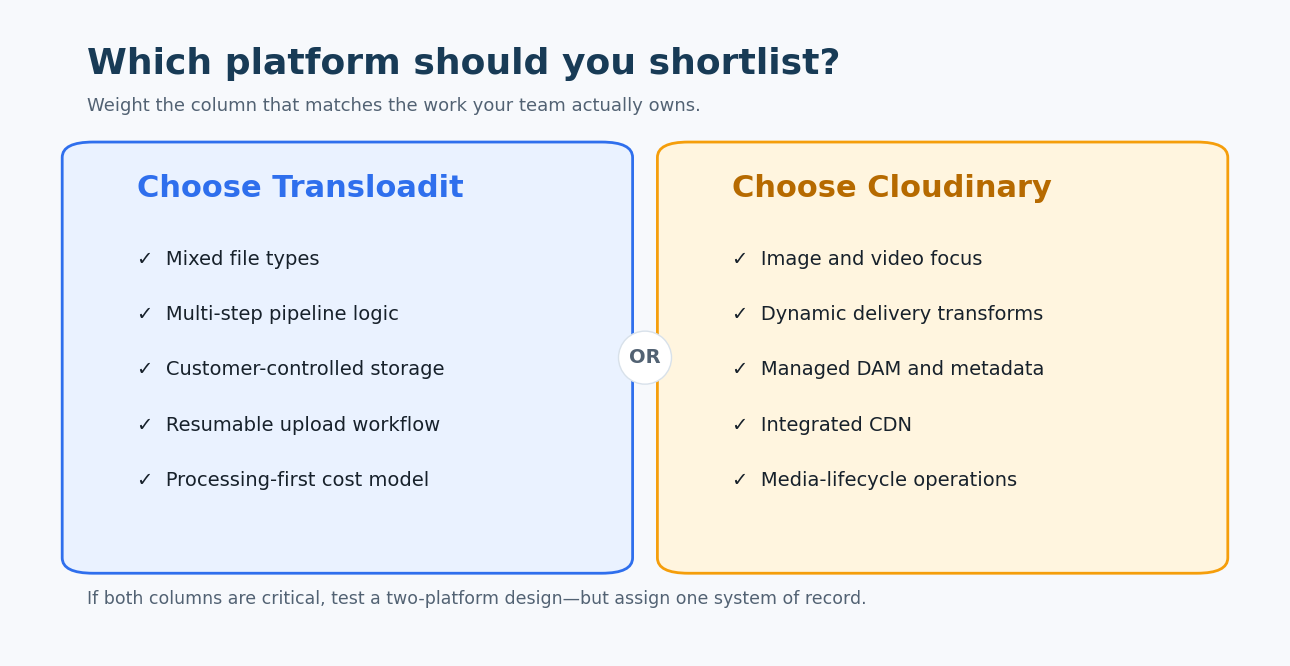
Transloadit centers on programmable file-processing pipelines. Cloudinary centers on the full visual-media lifecycle, from asset management to transformation and delivery.
Transloadit vs Cloudinary: the quick answer
- Choose Transloadit for mixed file types, document and audio workflows, resumable uploads, malware checks, conditional processing, multi-step pipelines or storage-provider flexibility.
- Choose Cloudinary for image and video asset management, dynamic transformations, automatic optimization, responsive delivery, a managed CDN and marketer-friendly media workflows.
- Shortlist both when an application has complex upload processing and a large customer-facing image or video library. Some teams use Transloadit for ingestion and transformation, then send final visual assets to Cloudinary for management and delivery.
Transloadit vs Cloudinary comparison table
| Comparison area | Transloadit | Cloudinary |
|---|---|---|
| Core product | Programmable file-processing infrastructure built around reusable Templates, Assemblies and processing Robots | Image and video platform combining upload, asset management, transformation, optimization and delivery |
| Best fit | Engineering-led products with complex upload and processing workflows across several file types | Teams that need one system to manage and deliver large visual-media libraries |
| Primary abstraction | A processing pipeline: import, validate, transform and export | A managed media asset with transformations and delivery URLs |
| Workflow definition | JSON Templates connect processing steps; each execution is an Assembly | Upload parameters, named transformations, delivery URLs, DAM workflows and MediaFlows capabilities |
| File-type breadth | Designed for images, video, audio, documents, archives and other application files | Deepest capabilities focus on images and video, with raw-file storage and delivery also available |
| Image processing | Resize, crop, optimize, watermark, convert, analyze and compose through image-focused Robots | Extensive URL-based and API-driven image transformations, optimization and responsive delivery |
| Video processing | Transcoding, thumbnailing, concatenation, overlays, streaming preparation and related pipeline steps | Video transformation and delivery, adaptive streaming, AI-assisted operations and player integrations |
| Document and audio workflows | Strong fit when documents or audio must be converted, analyzed, packaged or combined with other steps | Possible for raw assets, but the platform’s primary differentiation is visual media |
| Upload experience | Pairs with Uppy for resumable, multi-source uploads and can import from remote services | Upload API, widgets and SDKs support browser, server and remote-source uploads |
| Conditional and parallel steps | Templates can branch, run steps in parallel and connect outputs to later steps | MediaFlows and transformation chains can automate visual workflows; model differs from a general file pipeline |
| Storage model | Can import from and export to customer-controlled storage and third-party services | Managed asset storage is a core part of the platform; external-fetch and delivery patterns are also supported |
| CDN and delivery | Processing-first; final files can be exported to the delivery stack the team chooses | Delivery-first capabilities are built into the platform through Cloudinary URLs and CDN infrastructure |
| Digital asset management | Not a general-purpose DAM | Includes DAM capabilities, metadata, search, collaboration and governance options by plan |
| Processing execution | An Assembly exposes step status, outputs, errors and completion notifications | Upload and transformation APIs expose asset and derived-resource results; delivery transformations can be generated on demand |
| Reusability | Templates keep workflow logic server-side and reduce client exposure | Named transformations and presets standardize repeatable visual operations |
| Pricing model | Primarily based on processed gigabytes, with plan allowances and product-specific details | Credit-based plans combine transformations, storage and bandwidth; enterprise terms can be customized |
| Operational flexibility | Strong when storage, CDN and processing should remain decoupled | Strong when a consolidated managed media stack reduces operational work |
| Main tradeoff | More engineering ownership for asset cataloging, delivery and business-user workflows | More platform coupling and a billing model that spans several media-usage dimensions |
Capabilities and pricing change. Confirm the live product documentation and contract terms for the specific workload you plan to run.
The biggest difference: processing pipeline versus media platform
Transloadit’s central object is an Assembly. An application starts an Assembly from a reusable JSON Template, supplies files or import instructions, and receives structured results as processing steps complete. A workflow can pull a video from cloud storage, inspect it, transcode several outputs in parallel, create thumbnails, package streaming files and export the results to another provider.
Cloudinary’s central object is a managed media asset. A team uploads or fetches an image or video, stores metadata, applies transformations, and delivers the original or derived version through a Cloudinary URL. Its value becomes clearer as the asset moves through review, search, reuse, optimization and delivery.
This creates a reliable decision rule:
- If the workflow ends when processed files have been delivered to your chosen storage, Transloadit’s model is often more natural.
- If the workflow continues through cataloging, governance, creative use and end-user delivery, Cloudinary’s integrated model is often more natural.
Neither approach is inherently more modern. The better boundary is the one that matches your team’s ownership model.
Workflow design and developer experience
How Transloadit workflows work
Transloadit Templates define a graph of processing steps. Each step uses a Robot, and later steps can consume outputs from earlier ones. Keeping the Template on Transloadit’s servers means the browser or mobile client can trigger an approved workflow without receiving sensitive storage credentials or the entire processing definition.
Assemblies are asynchronous and observable. Applications can poll status, use callbacks or wait for completion, depending on the integration. This works well for jobs that take longer than a web request and produce several related outputs.
The model rewards explicit pipeline design. Engineers should define what happens when one step fails, which outputs are required, how duplicate submissions are handled and where partially completed assets are stored.
How Cloudinary workflows work
Cloudinary supports signed and unsigned uploads, upload presets, SDK helpers and a broad transformation URL syntax. Teams can apply named transformations for repeatability and generate optimized variants for different devices or delivery contexts. The asset remains addressable through a stable identity while derived versions are created and cached.
For non-engineering teams, the asset library and DAM workflows can be as important as the API. Search, metadata, access controls and collaboration reduce the need to build an internal media console.
The developer experience is particularly strong when the desired result is expressed as a visual transformation: crop to an aspect ratio, add an overlay, select an output format, adjust quality and deliver through a responsive URL.
Image and video capabilities
Both products can resize images and transcode video. The difference appears around the transformation.
Cloudinary connects transformation to delivery. A URL can request a specific width, crop, quality or format, and the resulting asset can be cached at the edge. That makes it well suited to responsive commerce imagery, editorial media, user avatars and video experiences where delivery optimization is part of the product requirement.
Transloadit connects transformation to a broader workflow. An uploaded video might also need an audio-only version, subtitles, preview images, metadata extraction, a malware check and export into a customer-owned bucket. The value is the orchestration across steps and file types.
When evaluating video, test the exact outputs you need:
- Input codecs and maximum source sizes.
- Output codecs, containers and adaptive-streaming formats.
- Transcoding time at typical and peak durations.
- Thumbnail, subtitle, watermark and concatenation requirements.
- Delivery bandwidth and cache behavior.
- Failure handling for corrupt or partially uploaded files.
A demo that processes a short MP4 is not enough evidence for a production video pipeline.
Uploads, validation and user-generated content
Transloadit is a strong candidate for products whose upload flow is itself complex. Its ecosystem includes Uppy, an open-source uploader that supports resumable uploads and multiple acquisition sources. The processing pipeline can then validate and route what was uploaded before it reaches final storage.
Cloudinary also provides upload widgets, SDKs and APIs. It is often simpler when uploaded content is already known to be image or video and should become a managed Cloudinary asset immediately.
For marketplaces, social products and other user-generated-content systems, compare the full path:
- Resume behavior on poor mobile connections.
- Server-side signature and preset controls.
- MIME-type and content validation.
- Malware or policy checks.
- Moderation and metadata extraction.
- Transformation fan-out.
- Final storage, access control and deletion.
- Webhook retries and idempotency.
The winner is the platform that removes the most custom glue from that complete path.
Storage, CDN and architecture control
Transloadit is intentionally compatible with decoupled architecture. A team can keep source and output files in its own storage provider and choose a separate CDN. That helps when data residency, an existing storage contract or portability matters. It also means the team remains responsible for the asset catalog, delivery configuration and lifecycle rules around those services.
Cloudinary reduces those boundaries. Storage, derived assets, transformation and delivery work as one system. This can lower engineering effort and improve observability across the media lifecycle. The tradeoff is that migration cost rises as more delivery URLs, metadata and operational processes depend on the platform.
Before choosing, decide who owns these functions:
- Original-file retention and legal holds.
- Derived-asset cleanup.
- CDN configuration and invalidation.
- Asset search and metadata quality.
- Role-based access for marketers and agencies.
- Regional storage or delivery requirements.
- Bulk export and exit procedures.
Pricing and total cost
Transloadit’s public pricing is centered on processed gigabytes. That is comparatively easy to connect to batch processing, but the number of passes over a file matters. A 1 GB source that produces several outputs or moves through several processing steps can consume more than 1 GB of billable work.
Cloudinary’s self-service plans use credits that cover transformation activity, managed storage and delivery bandwidth. This makes cost sensitive to the whole asset lifecycle, not only the initial processing job. Enterprise agreements may use different commitments and allowances.
Build a workload model instead of comparing entry prices. Include:
- Monthly source upload volume by file type.
- Average number and size of derived assets.
- Reprocessing caused by template or creative changes.
- Storage growth and retention period.
- Delivery bandwidth by geography.
- Cache misses and transformation-on-demand behavior.
- Peak concurrency and support requirements.
- Engineering time for storage, CDN, DAM and monitoring that remains outside the platform.
Run the model for a normal month, a launch spike and a year of retained assets. Media costs compound when old originals and derivatives remain stored indefinitely.
Which platform should you choose?
Choose Transloadit when
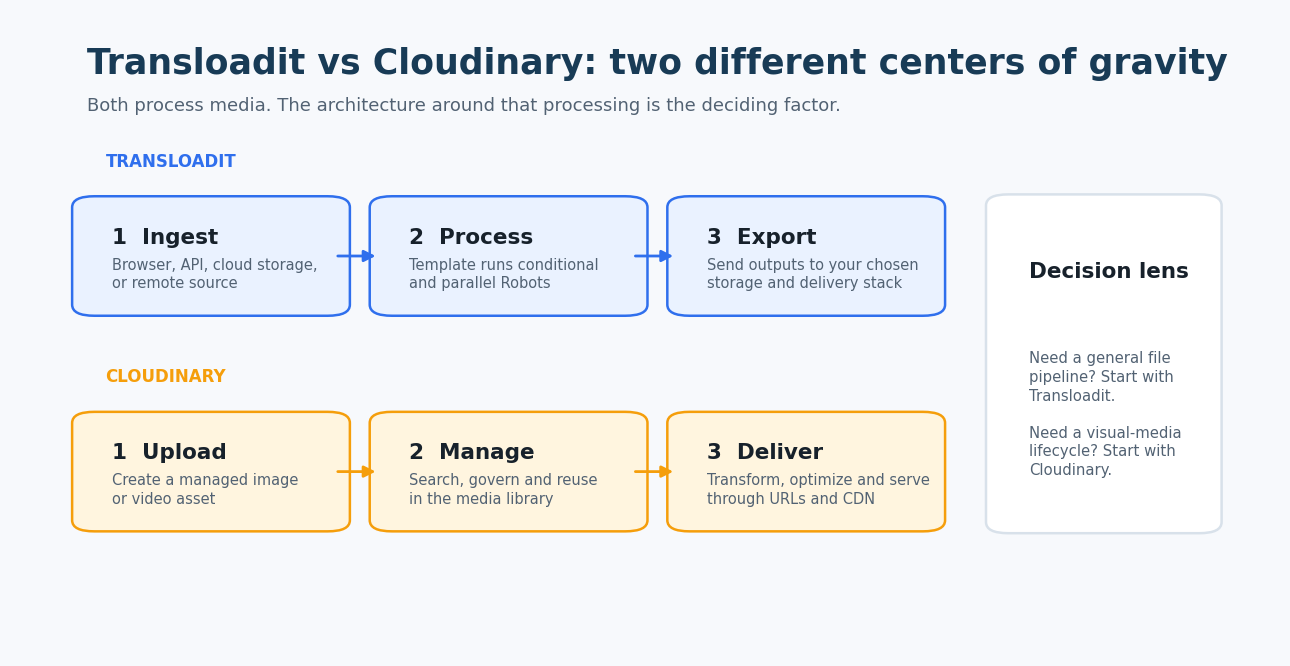
- Your application processes documents, audio, archives or other files in addition to images and video.
- A job needs conditional, parallel or multi-step processing.
- You want to import from and export to storage providers without making the processor your media system of record.
- Resumable user uploads are a product requirement.
- Engineering owns the workflow and prefers a JSON-defined processing graph.
- Processed-gigabyte billing maps cleanly to the workload.
Choose Cloudinary when
- Images and video are central to the customer experience.
- Dynamic transformation and optimized delivery should share one URL and CDN model.
- Marketing, content or creative teams need a searchable DAM and governance workflow.
- The team wants storage, transformation and delivery under one vendor.
- Responsive images, format negotiation and delivery analytics matter more than general file orchestration.
- A credit model across transformations, storage and bandwidth can be forecast reliably.
Consider using both when
- Uploads require specialized validation or mixed-file processing before visual assets enter a DAM.
- A complex video or document pipeline produces selected images or videos that need Cloudinary’s delivery layer.
- You can define a clear system of record, deletion process and failure boundary between the platforms.
Avoid a two-platform design if it only duplicates storage and transformations. The integration should remove a specific limitation, not add another vendor without a clear owner.
Migration and proof-of-concept checklist
Test one representative workflow from upload to final delivery. Use production-sized files and real network conditions.
| Test | What to measure | Decision signal |
|---|---|---|
| Upload resilience | Resume success, time to recover and duplicate prevention | Critical for mobile and user-generated content |
| Pipeline complexity | Custom code, workflow steps and failure branches | Shows which abstraction matches the application |
| Image delivery | Visual quality, p95 load time and cache performance | Favors the stronger delivery stack for customer-facing media |
| Video processing | Queue time, transcode time, outputs and error rate | Exposes throughput and codec gaps |
| Operations | Logs, retries, webhooks, asset search and support workflow | Predicts day-two engineering effort |
| Monthly cost | Processing, storage, bandwidth and adjacent services | Prevents comparing incomplete pricing units |
If migrating from Cloudinary, inventory transformation URLs, named transformations, metadata, access controls and DAM workflows before moving files. If migrating from Transloadit, inventory Templates, Robot dependencies, webhooks, storage credentials and every consumer of Assembly results.
Frequently asked questions
Is Transloadit an alternative to Cloudinary?
Yes, for upload and media-processing use cases. It is not a direct replacement for every Cloudinary capability. Transloadit focuses on programmable file pipelines, while Cloudinary also provides a managed media library, DAM workflows and an integrated delivery layer.
Which is better for image optimization?
Cloudinary is usually the stronger default when optimization must happen dynamically at delivery time across many image sizes, formats and devices. Transloadit is a strong option when optimization is one step in an ingestion pipeline and the result will be stored and delivered elsewhere.
Which is better for video transcoding?
Both can transcode video. Transloadit is attractive for multi-step processing and export workflows. Cloudinary is attractive when transcoding, management, adaptive delivery and the video player belong in one platform. Benchmark your codecs, durations and output ladder.
Does Transloadit provide a CDN or DAM?
Transloadit is processing-first and can export files to the storage and delivery services a team chooses. It is not positioned as a general-purpose DAM. Cloudinary includes managed delivery and DAM capabilities as part of its broader visual-media platform.
Can Transloadit process files other than images and video?
Yes. Its documentation includes processing building blocks for broader file workflows, including audio, documents and archives. Confirm the specific Robot, input limits and output format needed for your use case.
How do Transloadit Templates compare with Cloudinary named transformations?
A Transloadit Template defines a graph of processing steps and data flow. A Cloudinary named transformation standardizes a repeatable image or video transformation. They overlap for visual processing, but a Template is closer to an application workflow.
Which platform is cheaper?
There is no universal answer because the billing units differ. Model processed gigabytes for Transloadit and transformation, storage and delivery credits for Cloudinary. Include external storage and CDN costs when those remain outside the processing platform.
Can Transloadit and Cloudinary be used together?
Yes. A team can use Transloadit to ingest and process complex uploads, then send selected image or video outputs to Cloudinary for asset management and delivery. Define the system of record and deletion responsibilities before adopting this design.
What should I test before choosing?
Test upload recovery, the full processing graph, large-file and video throughput, webhook reliability, image-delivery performance, asset operations and total monthly cost. Use the same source files and outputs on both platforms.
Conclusion
The Transloadit vs Cloudinary decision is primarily about product scope.
Choose Transloadit when your core requirement is a programmable file-processing pipeline that spans file types, storage providers and several dependent steps. Choose Cloudinary when your core requirement is to manage, transform, optimize and deliver image and video assets through one integrated platform.
If the workload genuinely needs both processing depth and a full visual-media lifecycle, a combined architecture can work. Keep the boundary explicit and validate that the operational benefit is greater than the cost of two systems.
Contributor credit
This article was informed by written input from [email protected] of Transloadit. We independently checked the comparison against current product documentation and separated vendor perspective from editorial analysis. Connect with Aditya Ghelani on LinkedIn.
Official sources
- Transloadit documentation
- Transloadit Assemblies API
- Transloadit Templates
- Transloadit pricing
- Cloudinary documentation
- Cloudinary image transformations
- Cloudinary video transformation and delivery
- Cloudinary Upload API
- Cloudinary transformation reference
- Cloudinary pricing
- Cloudinary plan comparison
Product capabilities and prices change. Verify the current documentation and contract terms before making a production decision.